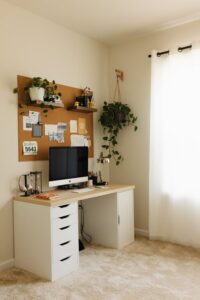
Tips for Creating a Cozy and Productive Home Office Space


Creating a cozy and productive home office space is essential for anyone working remotely or managing tasks at home. A well-designed workspace can improve focus, reduce stress, and make working from home more enjoyable. Whether you have a small nook or a dedicated room, these helpful tips can guide you in setting up an office that meets your needs.
Choose the Right Location
Find a Quiet Spot
Select a space in your home that is quiet and has minimal distractions. Away from busy areas like the kitchen or living room helps maintain focus.
Consider Natural Light
Good lighting improves mood and reduces eye strain. If possible, place your desk near a window. Natural light makes the workspace feel warm and inviting.
Invest in Comfortable and Functional Furniture
Ergonomic Chair
A supportive chair is crucial for long hours of work. Choose one that provides good lumbar support and adjustable features to fit your posture.
Appropriate Desk
Your desk should be the right height to avoid strain on your wrists and shoulders. Consider a desk with enough surface area for your computer, notebook, and any other essential tools.
Organize Efficiently
Use Storage Solutions
Declutter your space with shelves, filing cabinets, or desk organizers. Keeping items organized minimizes distractions and helps you find what you need quickly.
Cable Management
Messy wires can be frustrating. Use cable clips, ties, or under-desk trays to keep cables neat and out of the way.
Personalize Your Space
Add Comforting Elements
Include items that make your office more comfortable, like a soft rug, cushions, or a cozy throw blanket.
Incorporate Plants
Houseplants can improve air quality and add a touch of nature, making the space feel more calming and alive.
Decorate with Inspiration
Hang artwork, motivational quotes, or photos that inspire you, but avoid overcrowding your walls to keep a clean and peaceful environment.
Optimize Lighting
Layer Lighting
Use a combination of overhead lights, task lamps, and ambient lighting to reduce eye strain and create a welcoming atmosphere.
Choose Warm Light Bulbs
Warm white lights create a cozy environment, which can help you feel relaxed yet alert.
Establish Boundaries
Separate Work and Personal Areas
Even if your home office is in a shared room, clearly define your workspace with a room divider or a specific desk area to mentally separate work from leisure.
Set Work Hours
Having a schedule helps maintain a routine. Communicate your work hours to household members to minimize interruptions.
Enhance Productivity Tools
Keep Essentials Within Reach
Stock your desk with frequently used supplies such as pens, notebooks, and chargers to minimize getting up during work sessions.
Use a Comfortable Keyboard and Mouse
Ergonomic keyboards and mice reduce strain and contribute to longer comfortable working periods.
Minimize Noise
Use Noise-Canceling Headphones
If you can’t avoid background noise, headphones can help you focus better.
Add Soft Furnishings
Curtains, rugs, and cushions absorb sound and reduce echoes in the room.
Maintain Cleanliness
Regular Tidying
Spend a few minutes each day cleaning your workspace. A tidy desk boosts mental clarity.
Air Quality
Keep your office well-ventilated and clean to maintain energy levels and concentration.
—
Creating a cozy and productive home office space doesn’t require a big budget or a large room. By thoughtfully selecting your location, investing in ergonomic furniture, organizing efficiently, and personalizing the environment, you can build a workspace that works for you. Remember, it’s about striking the right balance between comfort and functionality to help you stay motivated and productive every day.